Using the Panel
Automated Translation
This documentation has been automatically translated from Polish. While we strive for accuracy, some nuances may be lost in translation. If you notice any errors or unclear passages, please refer to the Polish version or contact the author.
Note: This manual uses Polish screenshots, but the Firmware itself (Admin panel), on-screen messages shown on the LED display, and the Firmware uploader website are all available and translated to English. The firmware will display English messages and have an English GUI.
How to Use the Panel
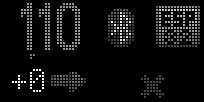
After proper configuration, the panel displays current glucose:
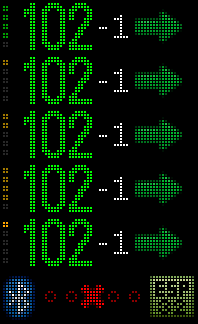
On screen we see, from left to right:
- Flashing glucose freshness indicator
- Glucose value
- 5-minute delta
- Trend arrow
Glucose Freshness Indicator
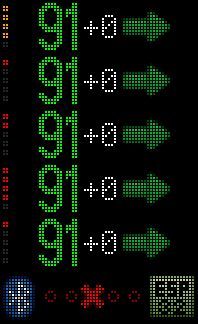
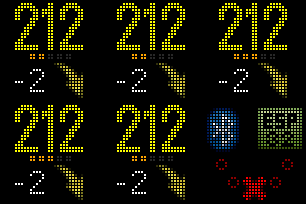
Shows how long ago the reading was taken: - Flashing 1st green dot - less than a minute ago - Flashing 2nd green dot - less than two minutes ago and so on,
- 🟩 green dots are respectively from 1 to 5 minutes
- 🟨 yellow dots are from 6 to 10 minutes
- 🟧 orange dots are from 11 to 15 minutes
- 🟥 and red ones - from 16 to 20 minutes
In night mode, dots don't flash, and in grayscale configuration, instead of colors – size (number of pixels) in dots indicates time range:
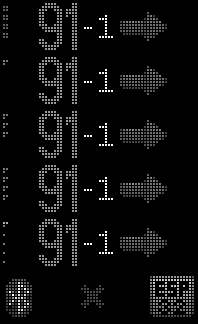
⠛dots with 4 pixels are from 1 to 5 minutes⠋dots with 3 pixels are from 6 to 10 minutes⠉dots with 2 pixels are from 11 to 15 minutes⠁single pixel dots - from 16 to 20 minutes
Glucose
Current glucose expressed in mg/dL
Currently, the system doesn't support mmol/L units. (Too few users in Poland/Europe use it, and I don't have access to a test data source. If you want to support the project on this topic, contact me.)
5-Minute Delta
Delta is the difference between the previous reading, 5 minutes ago, and the current one. It shows how fast glucose is changing. This value comes from Nightscout.
Trend
The trend arrow visualizes how fast glucose is changing (what the delta is) – it's determined based on delta and calculated by Nightscout
Error Messages
No / Old Readings
Sometimes there are "gaps" in CGM/FGM readings. There are many reasons for this – some include Bluetooth interference, temporary reading suspension in the sensor (because raw measurements are too "erratic"), problems in the receiver (Android kills the reading app, WiFi loss) or on the Nightscout server (restart, update). All this will cause the displayed result to become increasingly old, beyond the typical max 6-7 minutes. You'll notice this by the color/appearance change of the glucose freshness indicator:
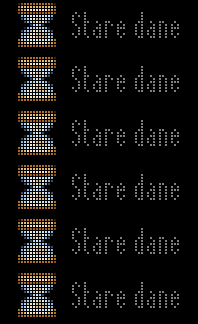
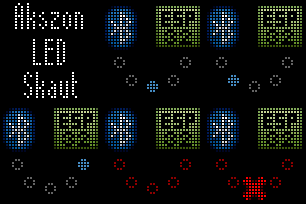
When the result is too old or the "gap" in data is too long – or there's no glucose data in Nightscout – a message about old data appears:
WiFi Problems
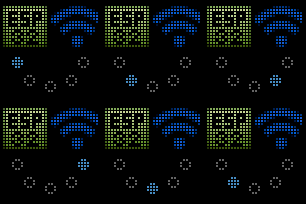
In case of internet loss – i.e., WiFi network works but there's no internet access – you'll see a WiFi error or Connecting to Nightscout message. These messages may display for several minutes during WiFi/Nightscout connection attempts, but if they last longer – check your home internet, WiFi, and whether the Nightscout server is working properly and accessible (e.g., while on WiFi, go to your Nightscout address on your phone; check the same while switching to mobile internet)

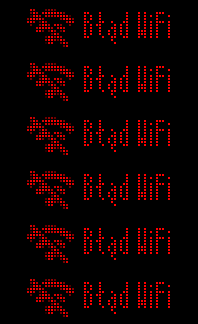
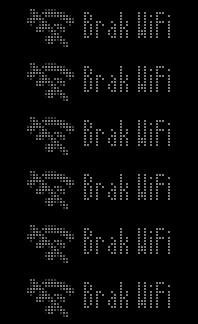
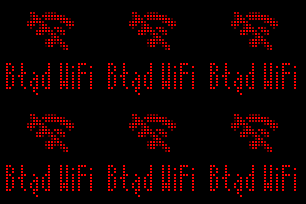
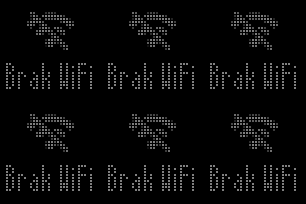
A special case is the No WiFi message. It means the controller doesn't see the previously configured WiFi network. Check with your phone if that network is still visible. If not – check settings or restart the router. If it's visible on the phone – restart the controller. If that doesn't help – position the controller differently or closer to the WiFi router. If that doesn't help and you have a controller based on ESP32-C3 SuperMini – consider switching to a device based on Seeed Xiao ESP32-C3 or S3, which have an external, larger WiFi antenna and handle WiFi network visibility better.
Nightscout Problems
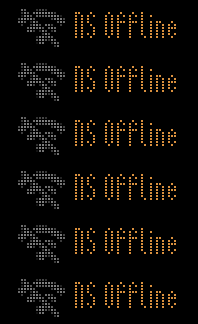
If the controller cannot connect to the Nightscout server due to network-related reasons, but the controller has internet access (it just can't connect to Nightscout), the message NS Offline will be displayed. Check if something is blocking your Nightscout site (e.g., your ISP, tools like Firewall/Z-Scaler, security features built into your router).
If for some reason the controller cannot "understand" the response from Nightscout, it will display a red NS Server message.
This should never happen - you may have the wrong server version or "something" between the server and controller is adding/modifying the response.
Check what the Nightscout tab shows in the Nightscout Admin Panel - whether there's garbage, errors, or other nonsense there.
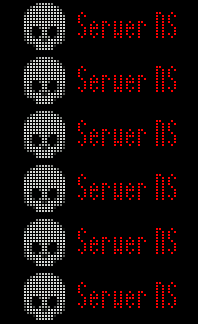
If the URL you provided points to Nightscout, but the controller detected that the server has crashed or is displaying nonsensical (or incompatible with the controller) data – you'll see a Server is dead message
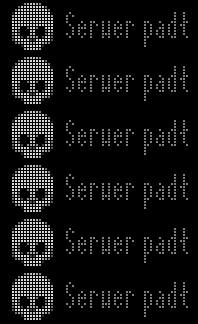
Check then whether on your phone, in Chrome browser, you can connect to Nightscout. If the address doesn't work or displays an error – fix or restart the Nightscout server according to the manufacturer's instructions.
If you're using my "Nightscout on Mikr.us" project:
- Wait a few minutes, it's possible that
 watchdog will detect the problem and restart the server
 - Make sure that – if using AAPS – you set the
Send data slowerflag (AAPS→three-dot menu→Settings→NSClientV3→Advanced settings) - Regularly clean up the server, if running out of space – clean up!
- Restart containers, server and check other issues
"xDrip already has a result, but it's not on the panel yet!"
It's normal and expected that the result is 6-7 minutes old, then updates and becomes one minute!
Before the result appears on the display, the sensor transmits it to its app, then it's usually "extracted" from the manufacturer's closed ecosystem to an open one using another app (BYODA, xDrip, Juggluco, patched...) and sent to Nightscout. This entire process sometimes takes even 2-3 minutes. Apps further down this "chain" don't know whether a new result is already available or not – they must actively check. To save battery and not overload the server, most of these apps – and our controller – don't check for result availability every second, but every several dozen seconds/few minutes – hence the delay.
In fact, most CGM and FGM systems measure glucose in interstitial fluid, not in capillary blood (like a glucometer) or whole blood (like in blood tests). This alone means the displayed glucose is delayed (several to over a dozen minutes) and differs from the current one. Plus, every glucometer and CGM/FGM has measurement error built into their operation mechanism – this is defined by MARD. For glucometers it's typically ±15 mg/dL below range and ±15% in and above range, for Libre 2 about 20%.
Why am I writing this? What your CGM/FGM, Nightscout, and consequently – the panel – shows is always inaccurate and delayed. This isn't just "CYA" that the documentation starts with a sentence not to rely on the panel's readings for therapy! Always check with a glucometer before administering insulin for high glucose, or before treating hypoglycemia. The panel is meant to be ONLY another place to "glance at" to stay constantly alert, besides watches, wallpapers, widgets, and phone apps – which remind us about glucose status.
I've made every effort to ensure the controller updates the result as quickly as possible while not breaking the Nightscout server. The logic for determining when and how often to refresh the result is very elaborate in the controller – and deliberately thought out!
Patience!
Experience from the "Nightscout on Mikr.us" project, which I started and help administrate – shows that dozens of people and many apps/gadgets are poorly programmed and/or configured. They can check dozens of times per second whether there's a new result, effectively DDoSing the server (overwhelming it with work).
Sometimes this is the result of "impatience" or OCD of a parent/patient/user, setting result refresh to "every second" instead of e.g., "every minute". This – for all the reasons described above – makes no sense! And therapeutic practice shows that too compulsive glucose monitoring often combines with "micro-management" and manually "helping" systems like loops – which paradoxically gives worse results!
This is a Cheap Solution
To be clear – the project uses LED panels whose main advantage is that they're cheap. Therefore, we must adjust our expectations and watch out for significant limitations of this panel – compared to solutions like dedicated displays or Ulanzi TC001:
- The panel is "dumb" – it knows nothing about the controller or what it's displaying. If it loses controller range – it will stubbornly display the last animation it received. It also doesn't let the controller know what it's displaying.
- The panel has no alarm function – no speaker, won't audibly alert about low or high glucose
- It's a toy! – I have no idea how long it will last, whether the LEDs are prone to burnout
To – with these limitations – ensure reasonably safe use, I designed a series of solutions that may be visible (and annoying), but their purpose is to prevent misleading panel operation:
- The controller sends GIF animations to the panel – because only these work stably and you can "embed" display time for individual frames/information. The panel supports many other modes – animated colorful texts etc., but their practical combination in a predictable and reliable way proved impossible.
-
The default and only permanently uploaded animation is version information with controller connection animation. In case of restart or loss of range, it displays by default, suggesting the panel is waiting for the controller to set it up.
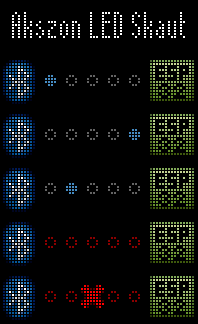
-
Glucose animation is sent as a temporary animation, every minute, unless the Nightscout result arrives sooner. The animation has frames generated "into the future," showing increasing glucose age, then connection error. In case of controller range loss or failure – the panel will show glucose getting older and older, then – that the controller isn't connected and isn't updating glucose.
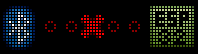
-
Default animation is uploaded with each panel pairing, just in case – because we don't know its memory state.
In return, you have a cheap solution that's reasonably easy to buy, and the panel is itself a finished product, requires no soldering, has packaging – if you buy at Action (in Poland), even with warranty.
Other matrix resolutions
Panel 32x32
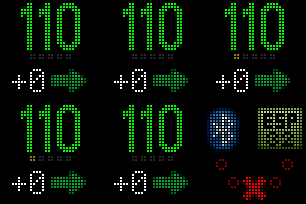



Troubleshooting, Step by Step
- Check if your sensor and CGM/FGM system is working and showing current readings?
- Check if Nightscout has current CGM/FGM results? Is the Nightscout server working? Is the appropriate app sending glucose to it?
- Check if the WiFi network to which the controller is connected is working, and the controller has the correct password?
- See if you can connect to the controller's Access Point from your mobile phone (WiFi network
akszon-led-skaut-****, address:192.168.4.1)? Are there additional error details in the panel? Can you see your WiFi network and the LED panel's BLE device in the panel? - Does the panel show an error message? Is the glucose freshness indicator animating?
- Disconnect and reconnect power: panel and controller. Restart home WiFi.
- Check if there's a newer controller firmware version. If there is, do an OTA update
- Read the section above again about error messages and how to resolve them.
- If nothing helps – look for posts on the topic on the Diabetes Technology (Polish) Facebook group.
- Use the search function first – only then write a post with a question!
- Before asking – read the article How To Ask Questions The Smart Way
Let's respect each other...
Skipping the order listed above will result in an assertive but harsh response from me 
The group has several thousand users, several administrators, and one me. I understand it's more convenient to ask in a minute than to read for 5 minutes, but I (and we as admins) can't answer private messages 24/7. The DIY / Open Source diabetes tools ecosystem is complex and diverse – that's its biggest pain point and also its strength. That's why we have a support group on FB so we can together learn and jointly solve problems.
This is a DIY project – "do it yourself," some initiative and effort in configuring and using it will be required from you! Even if I created this free software for you or resold some parts at cost; even if you supported this project financially or otherwise – I won't be able to individually, every time, and at every call configure or fix it!
As a TD admin, I received "urgent" messages privately on Sunday in the bathtub and during the week in the middle of a work meeting  Such lack of empathy or entitled attitude is fortunately very rare, but on the scale we operate – that's several to over a dozen people. I'm sick myself, I do this in my free time because I believe it makes the world better and this is how I "repay" my debt to the rest of the people who got involved and created Nightscout, AAPS – and hundreds of other technologies. I'll be proud and happy if the panel helps you at least a little in daily life with diabetes. Please – appreciate, support this project, and respect my time and voluntary involvement